Case study
A dashboard that watches company deadlines for the whole team
A custom system built privately for a UK accountant: company data pulled straight from Companies House, filing deadlines visible at a glance, and one place where the team keeps everything to do with a client.
Client
Private client (United Kingdom)
Scope
Web application
Industry
Accounting services
Approach
Built to order
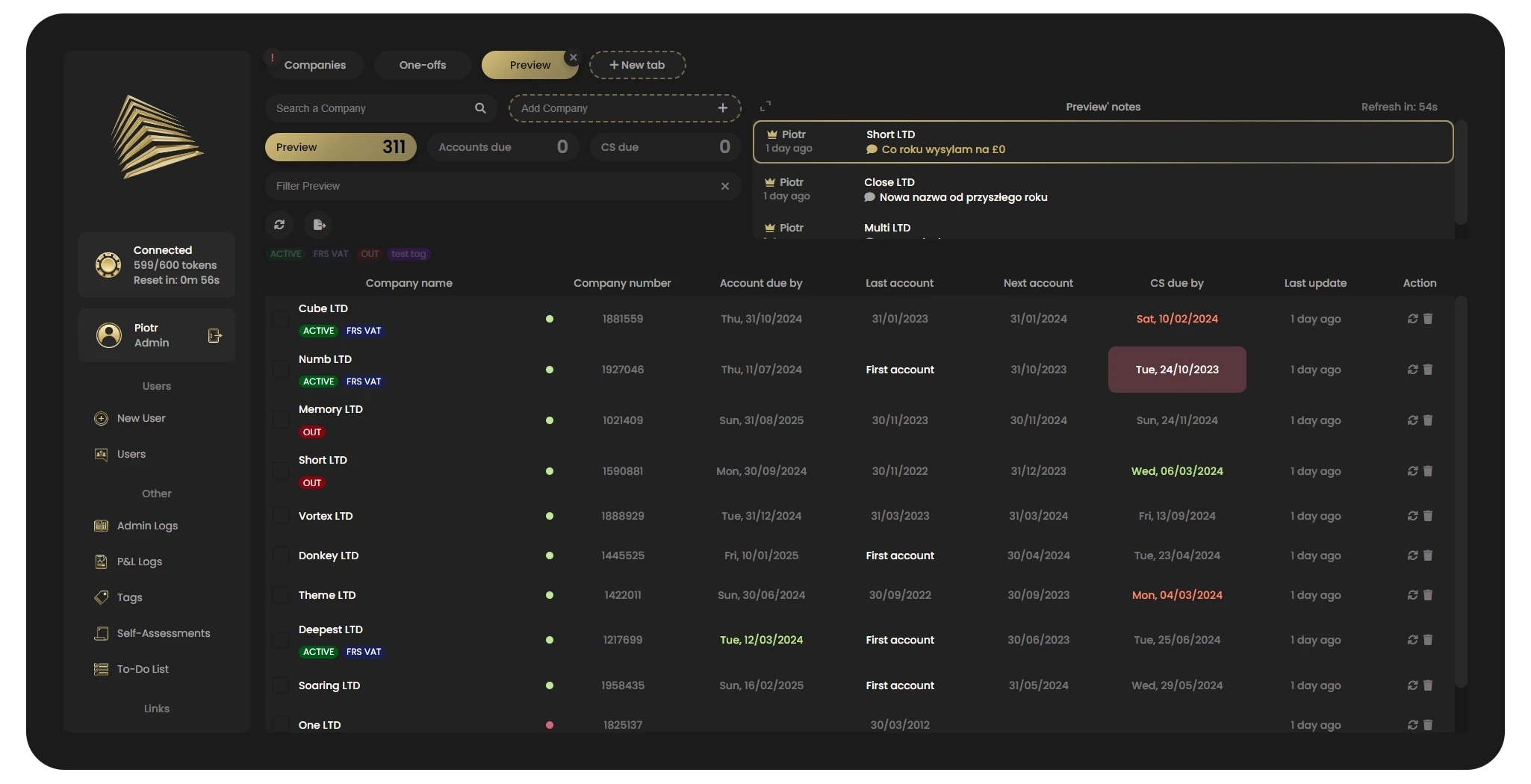
The heart of the dashboard
A company's entire tax profile in one place
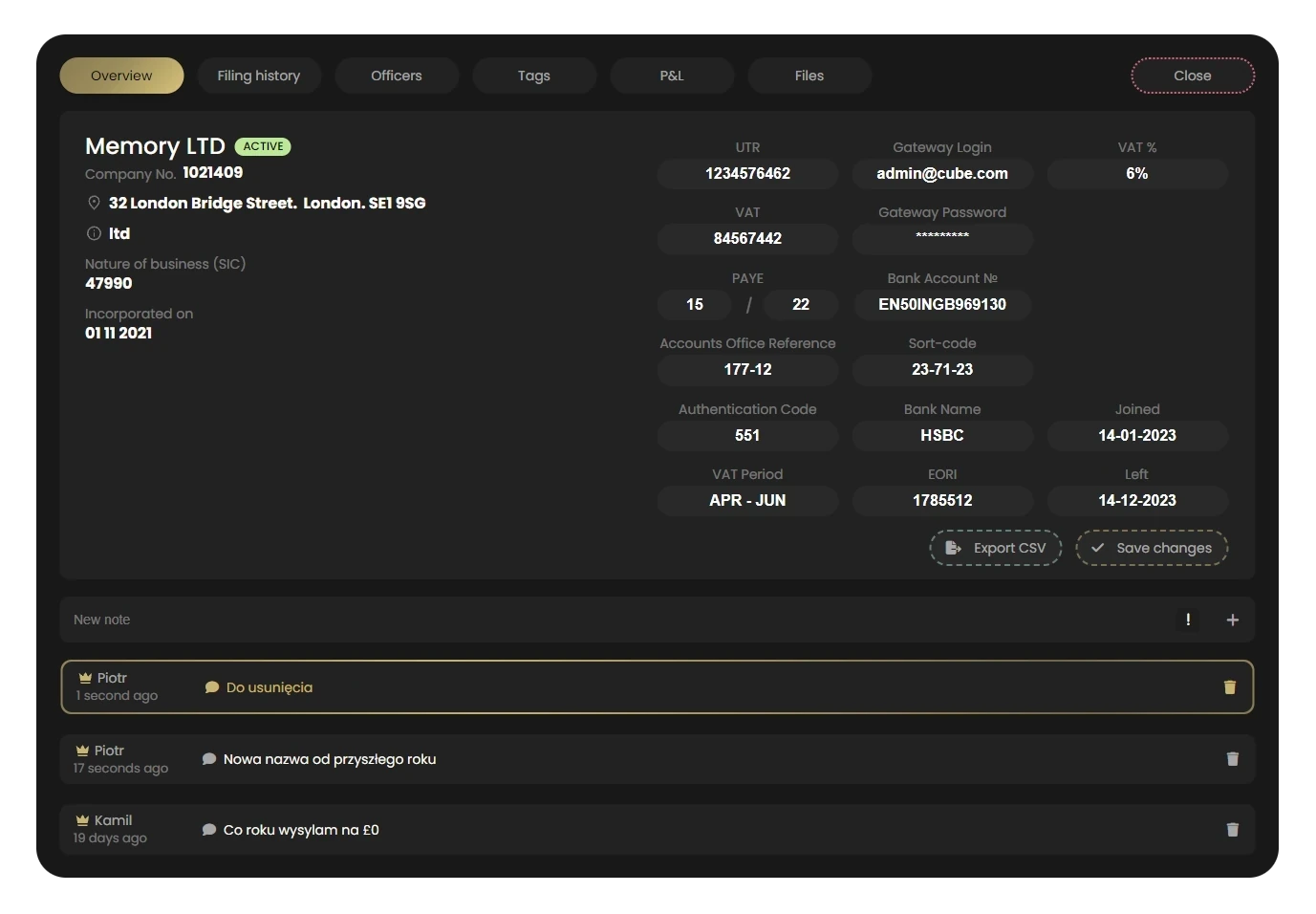
UTR, VAT with its rate and return period, PAYE, CIS, EORI, bank details and gateway access — next to everything pulled from Companies House. The rest is split across its own tabs: filing history, officers, tags, bookkeeping, files and Self Assessment returns.
Before this system existed
A growing client base stops fitting in a spreadsheet.
| Area | Before | After |
|---|---|---|
| Company data | Checked manually on Companies House, one company at a time | Pulled and refreshed automatically, in bulk too |
| Filing deadlines | Tracked by memory and spreadsheets | Colour-coded status in one view, sortable by date |
| Bookkeeping (P&L) | A rough sense of who sent what, when | Month by month, with a date and initials |
| Contact history | Scattered across email and private notebooks | Notes, tags and a journal pinned to the company |
| Documents | Folders on individual people's drives | A repository on the company record, with duplicate checks |
| Team access | Everyone sees everything | Roles, permissions and an activity log |
What the system does
01 — A full company profile, pulled automatically
A new company enters the system with a single search — registration details, address, SIC codes, filing history and officers are all there immediately, along with any previous company names and its current status. UTR, VAT, PAYE and CIS status get entered once by the team, instead of being looked up from scratch every time.
02 — A deadline nobody misses
Annual accounts and confirmation statements carry a colour status that reads at a glance. The table sorts on every column — including the date itself — so a company approaching its deadline moves to the top of the list before it turns into a problem.
03 — Working on the whole book, not one company at a time
Selecting many companies at once refreshes their data in a single operation, applies a shared tag, or removes them in bulk. The base can be imported from a CSV file and exported back out at any time — the data stays the practice's property, not the system's.
04 — Bookkeeping, month by month
For every company the team can see when documents came in, when the report was prepared and when it went out to the client — month by month, with a date and the initials of the person who did it. Nobody has to ask "did we already send that?"
05 — The team's memory, not one person's
Notes, tags and contact history stay with the company, not in one employee's head. Important notes are highlighted on the list, and seeing who on the team is currently at their desk makes handing a case over easy — without anyone having to ask what's been going on.
06 — Documents pinned to the company
Files are uploaded by dragging them onto the browser window, and the system files them per company and per tab. Duplicates are caught on upload, accepted formats are limited to the ones the practice actually uses, and every file can carry a note.
07 — A private workspace for everyone on the team
Alongside the shared base, anyone can create their own named tabs — each with its own set of companies, notes and files. One person runs their live cases there, another prepares companies for onboarding, and neither clutters the view for anybody else.
08 — Self Assessment in the same dashboard
Individual clients' annual returns get their own record — with UTR, National Insurance number, tax year and address — plus a history of prepared returns and notes independent of the company file. All without switching tools.
A problem the client never had to report
Companies House allows 600 requests per 5 minutes. Then it cuts you off.
That limit is set by Companies House itself, not by our system. Refreshing the whole base at once can burn through the allowance in seconds — and when it goes, Companies House stops answering for everyone in the office, not just the person who clicked.
So the dashboard counts requests itself. Every operation has a cost attached, the counter sits in the interface next to the time left until the window resets, and the system locks itself before the limit is reached — then unlocks automatically once the window rolls over.
In practice it means nobody in the office needs to know that the limit exists at all.
System scope
600 / 5 min
the official Companies House request limit, which the system polices for the team
2 sources
the company register and financial data, both pulled automatically
3 levels
of permission — from full administration down to view only
1 dashboard
instead of spreadsheets, inboxes and a folder on everyone's own drive
These numbers describe the system's scope, not its performance. 600 requests per 5 minutes is the official Companies House API limit — a constraint of the register that the system is built around. Out of respect for client confidentiality, we don't publish real usage figures.
Access control
A practice's client accounting data is sensitive — only the people who genuinely need access should have it.
Three permission levels separate who can manage the team, who can add and edit companies, and who can only view data. Every meaningful action — a data change, a deleted file, an edited permission — lands in an activity log with a user and a timestamp, so any question about who changed what has a real answer. Login itself is protected by a lockout after repeated failed attempts.
Inside the dashboard
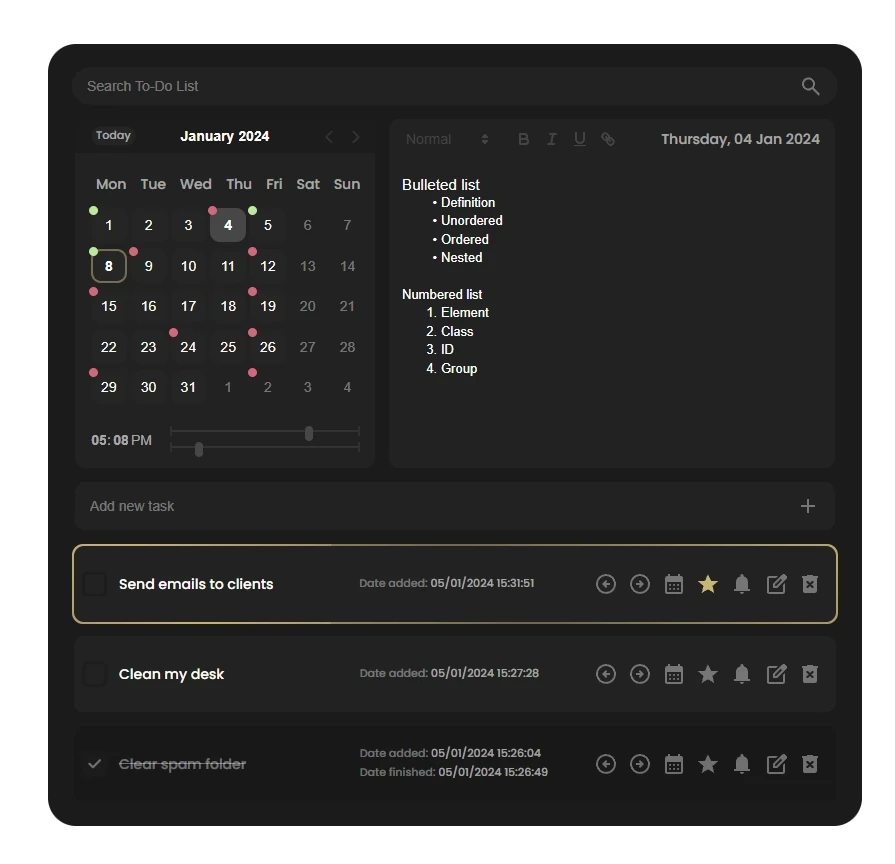
A calendar marking the days that have work waiting on them, and a to-do list: a task can be flagged as important, pushed to the next day, or ticked off with the completion date recorded. Each day also carries free-form notes, saved in the background.
FAQ
Questions we get most about this project
Is this tool publicly accessible?
No — it's a private dashboard for the accounting team's internal work, protected by login. There's no public URL or sign-up.
Why not an off-the-shelf CRM?
Off-the-shelf CRMs don't know Companies House filings or the rhythm of an accounting practice's work. We built a dashboard around this one accountant's specific process instead of paying for features nobody would use.
Does it scale as the client roster grows?
Yes — the dashboard handles a growing base of companies and individual clients, and refreshing data works in bulk, so adding more companies doesn't mean more manual work. Roles and permissions make it straightforward to grow the team without losing control over access.
Where does the company data come from?
Straight from the official Companies House register, with a financial data service on top. Nothing is retyped by hand, and data refreshes on demand — for a single company or for the whole base at once.
"The client didn't need another generic CRM — they needed a tool that understood their own work as well as they do."
blackpixel — on building this dashboard
Working with data that has to stay current and stay secure?
We build dashboards and systems around the real processes of regulated industries — accounting, law, administration. Tell us about your process and we'll propose scope and next steps.